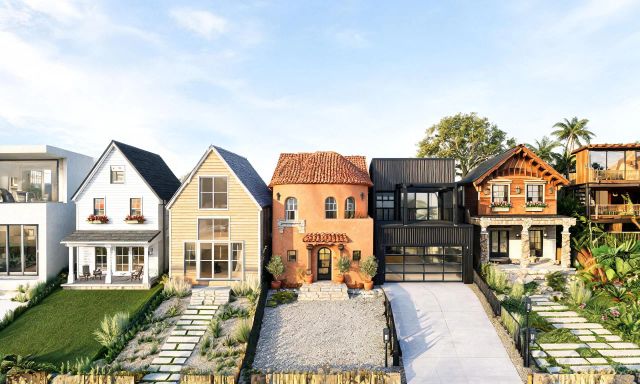
You want to see your house in a new siding color before you commit to buying a single gallon of paint. Traditional CAD software promises that, but it often demands a steep learning curve first.
This guide looks at faster, lighter ways to test exterior house design ideas without opening a full architecture suite. It compares free tiers, speed, and where a simple AI tool actually beats professional rendering software.
Key takeaways
- Full CAD suites like chief architect are built for professionals, not quick homeowner previews.
- AI-based tools generate exterior concepts in seconds instead of hours or days.
- Free tiers vary a lot: some give real exterior editing, others limit you to floor plans.
- Professional rendering services still cost real money per image, so testing ideas free first saves budget.
- The right tool depends on whether you need a construction document or just a visual gut check.
Why homeowners look beyond traditional CAD software
Chief architect and similar professional programs are built for architects and builders. They handle structural detail, framing, and permit-ready drawings.
That power comes with a cost. Most homeowners never need wall-framing precision just to decide if a navy front door works.
Learning curves are the real barrier. Menus, layers, and 3D modeling tools take hours to understand before you produce a single usable image.
- Homeowners want a quick visual, not a technical drawing.
- Real estate agents need fast before-and-after images for listings, not blueprints.
- Flippers want to test five finishes in an afternoon, not a week.
That gap is exactly where lightweight AI tools have stepped in over the last few years.
Lightweight AI alternatives for facade redesign
These tools trade construction-grade precision for speed and simplicity. Most work from a single uploaded photo instead of a modeled 3D structure.
vividoo
Best for: homeowners, agents, and flippers who want a fast, photo-based exterior concept without any CAD skills.
vividoo's AI Exterior Redesign tool works from an uploaded photo of your facade. You describe or select a style, and the tool restyles the exterior directly on that photo.
The free plan also includes an Empty Room Generator for clearing outdoor and indoor spaces, plus an AI Room Redesign tool for interiors. Together they cover both facade and interior previews without switching apps.
The main limitation is scope: vividoo restyles what exists in your photo rather than modeling a new structural layout. It is not a replacement for architectural drawings or permit documents.
Verdict: the best starting point for anyone who wants a realistic facade preview in minutes, not a technical model.
Cedreo
Best for: homeowners and small design-build firms who want 3D exterior and floor plan modeling without full CAD complexity.
Cedreo lets users build a home model from templates, then apply materials to walls, roofs, and landscaping elements. It leans closer to traditional 3D modeling than a single-photo AI edit.

Its strength is structural flexibility: you can reshape rooflines and add extensions, not just recolor existing photos. The tradeoff is more setup time than a photo-upload tool.
Verdict: a solid middle ground if you need actual layout changes, but expect a longer learning curve than a pure AI restyle tool.
HomeByMe
Best for: people who want a browser-based 3D model of their house and yard, including some exterior elements.
HomeByMe builds interior and exterior scenes from a library of furniture, materials, and structural pieces. You place items manually rather than describing a style and letting AI apply it.
Its notable strength is control over specific object placement in a 3D scene. The limitation is speed: building a full exterior scene manually takes considerably longer than an AI photo edit.
Verdict: useful if you enjoy manual 3D layout work, less ideal if you just want a quick facade preview today.
Sweet Home 3D
Best for: budget-conscious users comfortable with a more technical, open-style planning tool.
Sweet Home 3D is a downloadable planning application that lets users draw walls and place a limited set of exterior and interior elements in a 3D view.

Its strength is that it's a lightweight, installable option with no ongoing subscription pressure. The limitation is realism: renders look more like simplified models than photorealistic exterior previews.
Verdict: fine for rough spatial planning, but not built for a convincing "what will my house actually look like" preview.
Pro tip
Before you touch any paid software, run your exterior photo through a free tool first. It costs nothing and tells you fast whether a style direction is even worth pursuing.
Comparing free tiers and ease of use
Not all "free" plans mean the same thing. Some give you real exterior editing, others limit free use to floor plans or watermarked exports.
| Tool | Free tier scope | Learning curve | Output style |
|---|---|---|---|
| vividoo | Photo-based exterior restyle, decluttering, empty room generation | Low, upload and select style | Photorealistic, based on your own photo |
| Cedreo | Template-based 3D modeling, limited features free | Medium, template and material setup | 3D rendered scene |
| HomeByMe | Manual 3D scene building | Medium to high, manual placement | 3D rendered scene |
| Sweet Home 3D | Full app free to download | Medium, wall-drawing interface | Simplified 3D model |
| Chief architect-style CAD suites | Typically trial-based, not fully free | High, professional CAD interface | Technical, construction-grade drawings |
Pricing details and plan limits change often, so always check each provider's current plan page before deciding, including vividoo's own pricing page for the latest tiers.
Speed of results versus professional rendering software
Speed is where AI photo tools separate themselves most clearly from CAD suites and professional rendering services.
A professional architectural rendering service typically charges $200 to $400 per exterior image in the US market as of 2026, based on published rendering-industry benchmarks. Turnaround is usually days, not minutes.
Full CAD-style software, meanwhile, can take an experienced user 30 minutes to a few hours to build one exterior scene from scratch, even before rendering it.
| Option | Typical cost | What you get |
|---|---|---|
| Professional rendering service | $200-$400 per image (US, 2026) | Photorealistic exterior render, days of turnaround |
| Professional CAD suite (category range) | Software subscription cost varies by provider, check current plan pages | Full construction-grade modeling and drawings |
| Free AI facade tool | $0 | Fast photo-based style preview, no structural drawings |
| Entry-level AI design app subscription (category range) | Roughly $10-$30 per month, typical across published AI design app plan pages, 2026 | Expanded edits, more exterior and interior tools |
Worked example: testing three siding colors before hiring a professional.
- Professional render cost per image: $200-$400.
- Three renders needed to compare siding colors: $200 x 3 = $600, up to $400 x 3 = $1,200.
- Same three concepts using a free AI facade tool: $0.
- Total saved during the exploration phase: $600-$1,200.
- That is a 100% saving on the testing phase, before any final professional render is ever commissioned.
The math only covers the exploration stage. Many homeowners still commission one final professional render once they've picked a direction.
Pro tip
Use a free AI tool to narrow five ideas down to one. Then spend your rendering budget on a single polished image, not five rough ones.

When a simpler AI tool beats full architecture suites
A full CAD suite wins when you need permit drawings, structural framing plans, or precise measurements for a contractor.
A simpler AI tool wins in almost every other homeowner scenario.
- Deciding between two paint colors before buying supplies.
- Showing a real estate listing's curb-appeal potential to buyers.
- Testing a landscaping style before hiring a contractor for a quote.
- Getting a flipper-friendly before-and-after image for marketing.
In each case, speed and photorealism matter more than technical accuracy. That's the gap tools like vividoo's AI design tools are built to fill.
Where the free plan stops short
The free plan covers restyling, decluttering, and empty-space generation, both indoor and outdoor. It does not cover adding or replacing specific furniture or exterior features, which sit on paid tiers.
If your project needs precise object swaps or landscape-level changes, you'll move into the Starter or Pro tiers rather than staying on the free plan.

Getting started with an AI-first exterior design workflow
Start with a clear, well-lit photo of your facade taken straight on, not at an angle. That single input drives every result.
Run it through a free restyle tool first to explore two or three broad directions. Save the ones that feel right.
Browse the community gallery for real examples of exterior transformations before you settle on a style.
Once you've narrowed your options, decide whether you need a professional render, a contractor quote, or just a decision-making tool for yourself.